
Download Video Capturix 2007 – Free Screen Capture Software for Windows, Mac, and More
Video Capturix 2007 is a reliable and efficient screen capture software designed for Windows users who need to record their screen activities with ease. Developed by Alexandre Simões, this tool offers a straightforward yet powerful solution for capturing full-screen, window-specific, or custom region recordings. Whether you're creating step-by-step tutorials, recording online lectures, or documenting software glitches, Video Capturix 2007 delivers high-quality output with minimal setup.
The software is ideal for educators, content creators, gamers, and professionals who rely on visual documentation. With its lightweight design and intuitive interface, it ensures smooth performance even on older systems. The program supports various video formats, including AVI and WMV, making it easy to share or edit recordings later.
Download Video Capturix 2007 today and enjoy a secure, free, and hassle-free screen recording experience across Windows platforms.
Key Features of Video Capturix 2007
Video Capturix 2007 stands out in the world of screen capture tools thanks to its well-rounded feature set that balances simplicity with functionality. One of the most notable features is its ability to capture the entire screen, specific windows, or custom-defined regions with just a few clicks. This flexibility makes it perfect for users who need precision—whether recording a single application window or a full desktop session. The software also supports real-time audio capture, allowing you to record your voice or system sounds alongside the screen, which is especially useful for tutorial creators and educators.
Another standout feature is the built-in video editor, which enables basic trimming and splitting of recorded clips directly within the app. This eliminates the need for external editing software for minor adjustments. The tool also offers customizable recording settings, including frame rate, resolution, and quality levels, giving users full control over file size and output clarity. For those concerned about storage, the software includes options to compress recordings without significant loss in quality.
Video Capturix 2007 also supports keyboard shortcuts for quick start and stop recording, enhancing workflow efficiency. The interface is clean and user-friendly, making it accessible even for beginners. Additionally, the software runs in the background with minimal system resource usage, ensuring that your computer remains responsive during long recording sessions. Whether you're on a Windows 7 machine or an older system, Video Capturix 2007 performs reliably. With support for AVI and WMV formats, it ensures compatibility with most media players and video editing tools.
How to Install and Use Video Capturix 2007
Installing Video Capturix 2007 is a straightforward process that takes just a few minutes. Begin by downloading the software from a trusted source. Ensure you’re using a secure connection and verify the file integrity before proceeding.
Once downloaded, locate the installer file and double-click to launch it. Follow the on-screen prompts, accepting the default settings unless you have specific preferences. The installation wizard will guide you through the process, and you’ll be prompted to choose the installation directory.
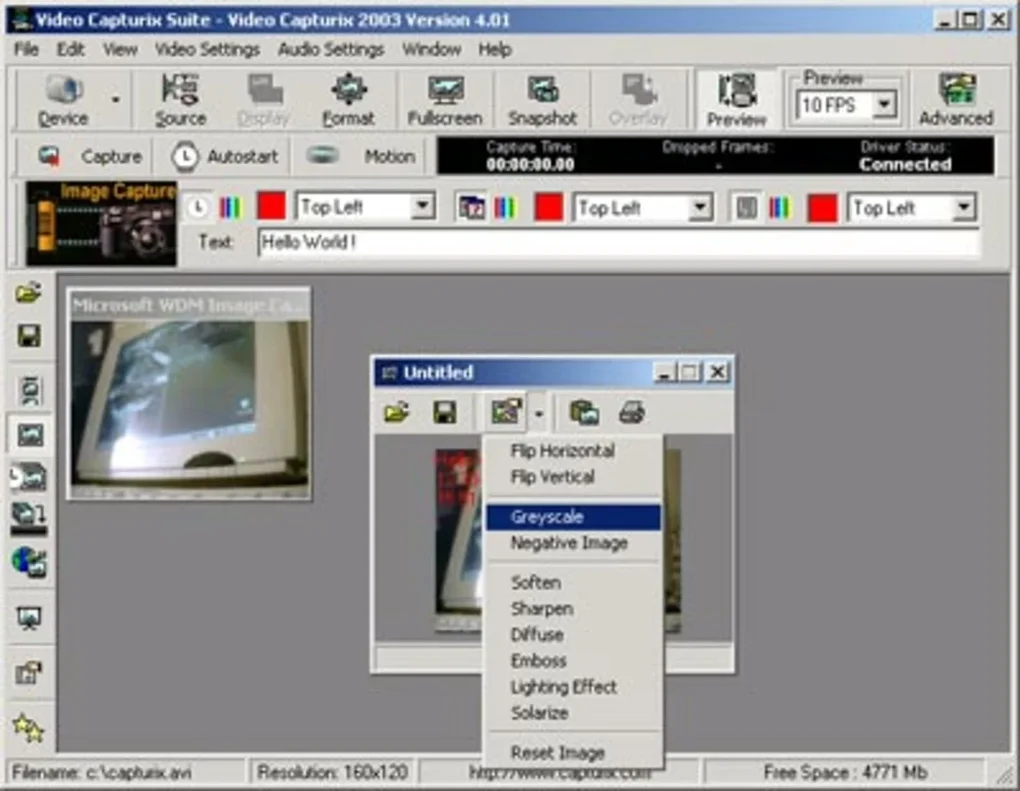
After installation, launch the application from the desktop shortcut or Start menu. The main interface is intuitive, with clearly labeled buttons for starting and stopping recordings. To begin capturing, select your preferred recording mode—full screen, window, or custom region.
You can also configure audio input settings, choosing between microphone, system audio, or both. Once everything is set, click the “Record” button and start your session. The software will display a small countdown timer to help you prepare.
When you’re done, click “Stop” to end the recording. The file will be saved automatically to your chosen folder, with a default name that includes the date and time. You can then use the built-in editor to trim unwanted segments or split the video into smaller parts.
For future use, you can customize the default settings to avoid reconfiguring every time. The software also supports batch processing, allowing you to record multiple sessions in sequence. With its minimal learning curve and reliable performance, Video Capturix 2007 is a great choice for both casual users and professionals.
Compatibility and System Requirements
Video Capturix 2007 is primarily designed for Windows operating systems, offering full compatibility with Windows XP, Windows Vista, Windows 7, and Windows 8. While it was released in 2007, the software remains functional on modern Windows 10 and Windows 11 systems through compatibility mode. Users can run it via the “Run as administrator” option or by enabling compatibility settings in the file properties. This ensures that even older software can operate smoothly on current hardware.
For Mac users, there is no native version of Video Capturix 2007. However, Mac users can still access its functionality using virtualization tools like Parallels Desktop or VMware Fusion to run a Windows environment. Alternatively, Apple’s built-in QuickTime Player offers similar screen recording capabilities, though with fewer customization options. On mobile devices, the software is not available for Android or iOS, but users can explore alternatives like ApowerMirror or Vysor for screen mirroring and recording on smartphones and tablets.
The system requirements are modest, making it suitable for older or low-spec machines. It requires at least 128 MB of RAM, 50 MB of free disk space, and a video card that supports DirectX 9.0c. The software does not require a high-end processor, which means it runs efficiently on systems with Intel Pentium or AMD Athlon processors. This lightweight footprint ensures minimal impact on system performance during recording sessions. Whether you're using a desktop, laptop, or older workstation, Video Capturix 2007 delivers consistent results without crashes or lag.
Pros and Cons of Video Capturix 2007
- Pros:
- Free to download and use with no hidden costs
- Lightweight and efficient, ideal for older systems
- Supports full-screen, window, and custom region recording
- Includes real-time audio capture for voiceovers
- Simple, intuitive interface for beginners
- Built-in video editor for basic trimming and splitting
- Supports AVI and WMV formats for wide compatibility
- Minimal system resource usage during recording
- Cons:
- Not updated since 2007; lacks modern features like HD recording
- No native support for Mac, Android, or iOS
- Interface appears outdated compared to modern tools
- Limited export options; no support for MP4 or modern codecs
- May require compatibility mode on Windows 10/11
- No cloud integration or automatic backup features
Frequently Asked Questions (FAQ)
Is Video Capturix 2007 free to download?
Yes, Video Capturix 2007 is completely free to download and use. There are no trial periods or subscription fees. The software is distributed as freeware, allowing users to access all core features without cost.
Can I record audio while capturing my screen?
Yes, Video Capturix 2007 supports real-time audio recording. You can capture your microphone input, system sounds, or both simultaneously. This feature is perfect for creating voice-over tutorials, gameplay commentary, or online lectures.
Does Video Capturix 2007 work on Windows 10 and Windows 11?
While Video Capturix 2007 was originally released for older Windows versions, it can still run on Windows 10 and Windows 11. You may need to enable compatibility mode or run the program as an administrator for optimal performance.
What video formats does Video Capturix 2007 support?
The software supports AVI and WMV formats. These are widely supported by most media players and video editing tools, ensuring easy playback and sharing.
Is there a mobile version for Android or iOS?
No, Video Capturix 2007 does not have a native mobile version for Android or iOS. However, users can explore alternative screen recording apps on mobile devices, such as Vysor or ApowerMirror, for similar functionality.
Final Thoughts and Call to Action
Video Capturix 2007 remains a solid choice for users seeking a no-frills, free screen capture tool for Windows. Despite its age, the software delivers reliable performance, especially on older systems where modern tools may struggle. Its lightweight design, intuitive interface, and support for audio recording make it a valuable asset for educators, content creators, and casual users alike. While it lacks modern features like HD recording, MP4 export, or cloud integration, its core functionality remains intact and effective.
If you’re looking for a secure, free, and straightforward way to record your screen without the bloat of modern software, Video Capturix 2007 is worth considering. It’s a proven tool that continues to serve its purpose well. Download Video Capturix 2007 today and experience hassle-free screen capture on your Windows device. Whether you're documenting a process, creating a tutorial, or preserving a gameplay moment, this software has you covered.







